Route all your homelab services through Traefik
Set up Traefik behind Cloudflare Tunnel so every self-hosted service — Jellyfin, dashboards, tools — shares one entry point and one set of TLS, auth, and security rules
Your homelab grew and now you have Jellyfin, qBittorrent, a dashboard, some AI tools, and each one wants its own port or its own complicated setup. Traefik fixes that: one reverse proxy that routes service.domain.name to the right container, adds auth where you want it, and sits happily behind Cloudflare Tunnel so you don’t need to punch holes in your firewall.
Architecture
Cloudflare Tunnel runs as a sidecar (cloudflared) that creates an outbound connection from your homelab to Cloudflare’s edge network. External HTTPS requests hit Cloudflare, get forwarded through the tunnel to Traefik as plain HTTP on port 80, and Traefik routes them to the right container based on the hostname.
Internet → Cloudflare Edge → Cloudflare Tunnel → Traefik (port 80) → Router → Middleware → Service → Container
                             (HTTPS)             (HTTP)
Why even bother with this?
Well the important part for a homelab is that there should be no open inbound ports. The tunnel initiates outbound and keeps the connection alive. Your ISP can block port 443, you can have CGNAT, you can be behind a double NAT and none of it matters. The tunnel is what makes self-hosting practical without a static IP or a business internet plan. TLS terminates at Cloudflare’s edge, so Traefik only needs plain HTTP on port 80. The Cloudflare dashboard is where you manage DNS and firewall rules for each subdomain.
Prerequisites
- A domain on Cloudflare (this guide uses
domain.name) - Docker and Docker Compose installed
cloudflaredinstalled, authenticated, and pointed at a tunnel- A Docker network named
proxyfor Traefik and its routable containers
docker network create proxyWhy a shared network? Traefik can only route to containers on the same Docker network. By putting everything on proxy, any container can be reached by its container name — no need to remember which port you mapped to which service. You can also have multiple containers with the same internal port (like port 3000) without conflicts, because Docker networks route by container name, not by port number.
Setup
1. Directory structure
traefik/
├── docker-compose.yaml       # Container definition
├── .env                      # Dashboard auth (gitignored)
├── .env.example              # Template
├── config/
│   ├── traefik.yaml          # Static configuration
│   └── dynamic/
│       ├── middlewares.yaml  # Headers, compression, auth
│       └── services.yaml     # Routers and backends
├── certs/
│   └── acme.json             # (unused in tunnel setup)
└── logs/
    ├── traefik.log
    └── access.log
2. Static configuration
config/traefik.yaml tells Traefik which entry points and providers to use:
entryPoints:
  web:
    address: ":80"

providers:
  docker:
    endpoint: "unix:///var/run/docker.sock"
    exposedByDefault: false
    network: proxy
    watch: true

  file:
    directory: /etc/traefik/dynamic
    watch: true

api:
  dashboard: true
exposedByDefault: false— containers are not automatically exposed. You must opt in via labels or file config.
Why? If you spin up a test container and forget about it, you don’t want it accidentally showing up on the internet. Opt-in only.
network: proxy— Traefik watches containers on theproxynetwork only.- File provider loads
services.yamlandmiddlewares.yamlfrom thedynamic/directory. - Only one entry point (
webon port 80) — no TLS config because Cloudflare Tunnel handles that.
3. Docker Compose
services:
  traefik:
    image: traefik:latest
    container_name: traefik
    restart: unless-stopped
    security_opt:
      - no-new-privileges:true
    env_file:
      - .env
    ports:
      - "80:80"
      - "443:443"
    volumes:
      - /var/run/docker.sock:/var/run/docker.sock:ro
      - ./config/traefik.yaml:/etc/traefik/traefik.yaml:ro
      - ./config/dynamic:/etc/traefik/dynamic:ro
      - ./certs/acme.json:/acme.json
      - ./logs:/var/log/traefik
    extra_hosts:
      - "host.docker.internal:host-gateway"
    networks:
      - proxy
    labels:
      - "traefik.enable=true"
      - "traefik.http.routers.traefik-dashboard.rule=Host(`traefik.domain.name`)"
      - "traefik.http.routers.traefik-dashboard.entrypoints=web"
      - "traefik.http.routers.traefik-dashboard.service=api@internal"

networks:
  proxy:
external: true- The Docker socket is mounted read-only — Traefik reads container metadata but can’t control Docker.
host.docker.internal:host-gatewaymakes containers on the host network reachable by hostname.
You might notice port 443 is published even though we only listen on 80. That’s intentional, it leaves the option to add TLS termination inside Traefik later without changing the compose file. Similarly, acme.json is mounted but unused here, it’s there if you ever switch to Traefik-managed certificates.
4. Start Traefik
docker compose up -dVerify it’s running:
docker logs traefik -fCloudflare Tunnel integration
Cloudflare Tunnel is a separate daemon (cloudflared) that creates a secure outbound connection from your server to Cloudflare. All traffic for *.domain.name flows through this tunnel.
Configure your tunnel to forward all traffic to Traefik:
# cloudflared config.yaml
ingress:
  - hostname: "*.domain.name"
    service: http://traefik:80
  - service: http_status:404
This means:
cloudflaredruns on the same Docker network as Traefik (or on the host withhttp://localhost:80)- It sends every
*.domain.namerequest to Traefik as plain HTTP on port 80 - Traefik’s routers then decide which container handles each subdomain based on the
Host()rule - The catch-all
404at the end is required — cloudflared rejects configs without a final fallback
Set up once with a wildcard DNS record. Instead of creating a separate DNS entry for every subdomain, add a single wildcard CNAME in the Cloudflare Dashboard:
| Type | Name | Target | Proxy status |
|---|---|---|---|
| CNAME | * | <tunnel-uuid>.cfargotunnel.com | Proxied (orange cloud) |
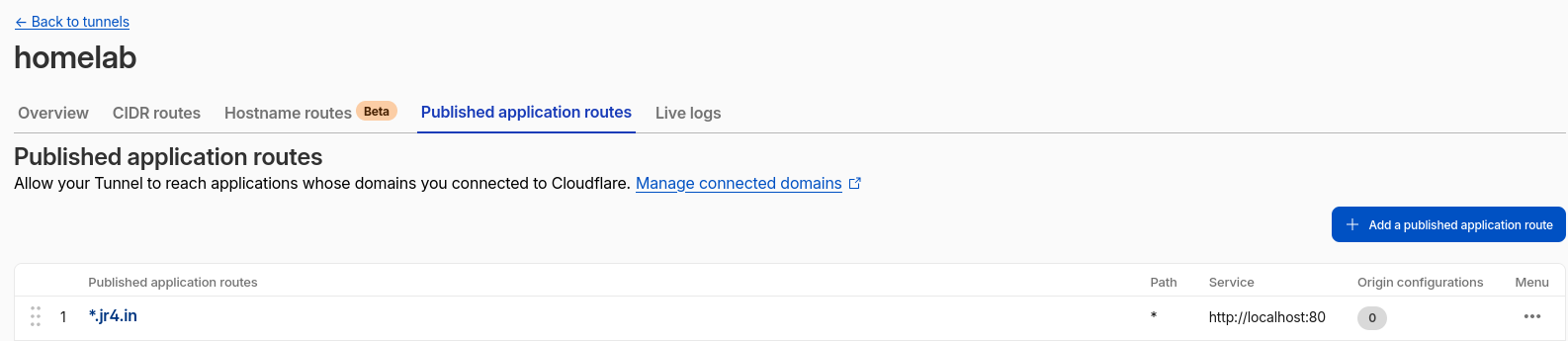
Why do this? After you set this wildcard record once, you never need to touch Cloudflare again. Every new subdomain only needs an entry in Traefik’s services.yaml and it just works immediately without restarting anything. The file provider has watch: true, so Traefik picks up changes as soon as you save the file. Add a service, save the file, refresh your browser and that’s it.
Defining routes
File-based configuration
All routes live in config/dynamic/services.yaml. A router matches incoming requests, a service points to the backend:
http:
  routers:
    jellyfin:
      rule: "Host(`jellyfin.domain.name`)"
      entryPoints:
        - web
      service: jellyfin
      middlewares:
        - default-chain

  services:
    jellyfin:
      loadBalancer:
        servers:
          - url: "http://host.docker.internal:8097"
Routers are matched by hostname. You can add alternatives:
rule: "Host(`files.domain.name`) || Host(`fm.domain.name`)"Services point to backends in one of three ways:
| Pattern | When to use | URL format |
|---|---|---|
| Docker network | Container on same proxy network | http://container-name:port |
| Host gateway | Container exposes ports on host (not on shared network) | http://host.docker.internal:port |
| Static IP | Container on a separate machine on the LAN | http://192.168.1.x:port |
Docker labels
For containers on the proxy network, you can define routing in the container’s own docker-compose.yaml:
services:
  myservice:
    labels:
      - "traefik.enable=true"
      - "traefik.http.routers.myservice.rule=Host(`myservice.domain.name`)"
      - "traefik.http.routers.myservice.entrypoints=web"
      - "traefik.http.services.myservice.loadbalancer.server.port=8080"
    networks:
      - proxy
Which one should you use? File-based config keeps all routes in one place — open services.yaml and you see everything at a glance. Labels keep routing co-located with the service definition — delete the container’s compose file and the routing goes with it. There is no wrong answer, pick whichever makes more sense to you.
Middlewares
Middlewares are transforms that happen between the router and the service like adding security headers, compressing responses, requiring a password.
Defined in config/dynamic/middlewares.yaml:
http:
  middlewares:
    secure-headers:
      headers:
        frameDeny: true
        browserXssFilter: true
        contentTypeNosniff: true
        forceSTSHeader: true
        stsSeconds: 31536000
        referrerPolicy: "strict-origin-when-cross-origin"

    rate-limit:
      rateLimit:
        average: 100
        burst: 50
        period: 1s

    gzip-compress:
      compress:
        excludedContentTypes:
          - text/event-stream

    basic-auth:
      basicAuth:
        users:
          - "user:$apr1$hashed_password_here"
Middlewares are assembled into chains:
    default-chain:
      chain:
        middlewares:
          - secure-headers
          - gzip-compress

    auth-chain:
      chain:
        middlewares:
          - secure-headers
          - basic-auth
          - gzip-compress
A router references a chain by name:
routers:
  opencode:
    rule: "Host(`code.domain.name`)"
    service: opencode
    middlewares:
- auth-chaindefault-chain— security headers + gzip. Used for most public services (Jellyfin, Glance, qBittorrent).auth-chain— same, plus HTTP basic auth. Used for tools you don’t want open to anyone who knows the hostname (OpenCode, web terminal).public-chain— adds rate limiting for API endpoints.
Why even use this? Well you don’t want anyone on the internet to be able to access your home server just by knowing your domain or hostname do you?
Many self-hosted apps have no built-in authentication. With Traefik’s basic-auth middleware, you wrap any app behind HTTP basic auth without changing a single line of the app’s code.
Compare the same app with and without auth:
# Anyone who knows the hostname gets in
routers:
  myapp:
    rule: "Host(`myapp.domain.name`)"
    service: myapp
    middlewares:
      - default-chain

# Requires a username and password
routers:
  myapp:
    rule: "Host(`myapp.domain.name`)"
    service: myapp
    middlewares:
      - auth-chain
The app receives requests normally — it has no idea auth exists. Traefik checks the Authorization header before the request ever reaches the backend. This works for anything over HTTP: dashboards, terminal apps, databases, monitoring tools. One shared auth config protects every service you point it at.
Route priority
When multiple routers match the same hostname, Traefik uses the priority field:
webterm-api:
  rule: "Host(`term.domain.name`) && (PathPrefix(`/api`) || Path(`/health`))"
  priority: 200

webterm:
  rule: "Host(`term.domain.name`)"
  priority: 100
Higher priority wins. Without explicit priority, Traefik calculates one based on rule complexity. Here, /api requests hit the API backend, everything else hits the web UI.
When does this matter? If you have a service that serves both an API and a frontend on the same domain, you need route priority. The API routes need a higher priority so they don’t get swallowed by the frontend’s catch-all router. Without this, you’ll see your frontend loading but the API calls failing with 404s.
Logs and debugging
# Live container logs
docker logs traefik -f

# Access log
tail -f logs/access.log

# Test a route
curl -vIH "Host: service.domain.name" http://localhost
Set log.level: DEBUG in traefik.yaml while setting up, then switch to INFO once everything works — DEBUG is noisy but shows you every request and every routing decision Traefik makes.
Common issues
503 Service Unavailable
Traefik can’t reach the backend. This usually means either the container isn’t running, isn’t on the proxy network, or you’re pointing at the wrong URL.
Check:
- Is the container running? (
docker ps) - Is it on the
proxynetwork? (docker network inspect proxy) - If using
host.docker.internal, is the container’s port actually published to the host?
404 Not Found
No router matched the request. You typed a hostname but Traefik doesn’t know what to do with it.
Check:
- Does the
Host()rule exactly match the hostname in the URL? - Is the router using the correct entry point (
web)?
Cloudflare Tunnel shows 502/503
The tunnel can reach Traefik but Traefik can’t reach the backend, or the tunnel’s ingress rule points to the wrong address. Verify with:
curl -H "Host: service.domain.name" http://localhostIf this works but the tunnel doesn’t, the problem is in the cloudflared config, not Traefik.
Dashboard not loading
The dashboard router is defined via Docker labels on the Traefik container itself:
labels:
  - "traefik.enable=true"
  - "traefik.http.routers.traefik-dashboard.rule=Host(`traefik.domain.name`)"
  - "traefik.http.routers.traefik-dashboard.service=api@internal"
api@internal is a special service that Traefik provides — it points to its own API and dashboard. You don’t point this at a separate container.
Cloudflare error 1033 — origin unreachable
A 1033 error from Cloudflare means the tunnel can’t reach your server. Your homelab machine is likely offline, sleeping, or the Traefik container has stopped.
Check the obvious things first:
# Is the machine on?
ping your-server-ip

# Is Traefik running?
docker ps | grep traefik

# Is the tunnel running?
docker ps | grep cloudflared
If the machine is on but Traefik died, restart it:
docker compose up -dIf the tunnel died, restart cloudflared. The tunnel needs Traefik to be up — without the reverse proxy, there is nothing on port 80 to forward to.
Cleanup
docker compose down
docker network rm proxy